

The Elders Finance Banking App makes handling your savings and transactional accounts quick and easy. Here are five reasons you should download it to your mobile device today.

In today's fast moving world, access to your funds and banking accounts on-the-go is essential. That's why we've introduced the Elders Finance Banking App, giving you secure and instant access to your accounts when you need it.
Once you've registered for internet banking and downloaded the app, you'll be prompted to set up a safe and secure login. Choose from:
If your device supports it, you could also opt for:
No more waiting in line or in an online queue. Day or night, via your App you can:
* This can only be performed if you are registered for SMS Secure.
Forgot to pay a bill or need to transfer funds to a friend?
Don't panic. You can do it all on the App.
You can also add a layer of payment protection with Confirmation of Payee(CoP).
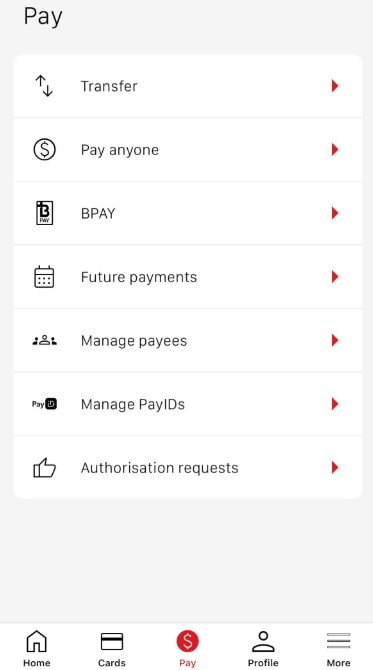 The payments screen on the Elders Finance Banking App.
Skip the queue and message us via the App. A customer specialist will message you back with assistance.
Please note this service is available Monday to Friday, from 8:00am to 6:00pm (AEST). If you require emergency assistance after hours, please phone phone 1800 272 111.
The App is the ideal tool for individuals and joint account holders who wish to save for a goal (or two)
Apple, App Store, iPhone, iPad, iPod, Touch ID and Face ID are trademarks of Apple Inc., registered in the U.S. and other countries. Google Play and the Google Play logo are trademarks of Google LLC. Temporary service disruptions may occur.
® Registered to BPAY Pty Ltd (ABN 69 079 137 518).
* BPAY is not available on all Elders Finance accounts.
Disclaimer: Elders Rural Services Australia Limited ABN 72 004 045 121 Australian Financial Services Licence 237757 (Elders) has entered an arrangement to distribute banking products issued by Auswide Bank, a division of MyState Bank Limited ABN 89 067 729 195 Australian Financial Services Licence 240896, a wholly owned subsidiary of MyState Limited ABN 26 133 623 962. Auswide Bank is a subscriber to the Australian Banking Association's Banking Code of Practice. Your rights under the Code apply when using banking products issued by Auswide Bank. This information is general in nature and does not consider your personal objectives, financial situation or needs. Before deciding whether to apply for a financial product, you should seek professional advice and consider the relevant Terms and Conditions and Target Market Determination on the Elders website. Elders may receive a commission from Auswide Bank if you successfully apply for a financial product through Elders. For more information on Elders’ relationship with Auswide Bank, please read the Elders Financial Services Guide.